Ten thousand people hit the same page the exact millisecond your cache expires, and a naive cache forwards all ten thousand to your backend at once. cache-turbo forwards one. The other 9,999 get served a slightly stale copy from RAM while that single request quietly fetches a fresh one. Nobody waits. Your database never finds out it was supposed to panic.
This is a build guide. By the end you’ll have a page cache running inside nginx itself: no Varnish daemon, no Lua, no second port to babysit. We’ll go from a stock nginx to a tuned, fleet-shared, self-monitoring cache in nine steps, and I’ll tell you which knob pages you at 3 a.m. if you get it wrong.
First, the thirty-second version of why. Your backend is slow. I don’t care what it’s written in. PHP, Node, Python, that Rust service you’re very proud of: the moment it has to talk to a database, render a template, and stitch together a page, you’re looking at tens to hundreds of milliseconds per request. A WordPress homepage that wakes PHP-FPM, runs forty plugins, and fires a dozen MySQL queries can take 600 to 900 ms to build. nginx can hand you a saved copy out of memory in about 0.4 ms. That’s not a typo. It’s roughly a thousand to one. So you build the page once, keep it, and serve everyone else the copy. That’s a page cache, and cache-turbo is one that lives in the worker processes you already have.

Add an in-process page cache to nginx with cache-turbo: build the module, declare a shared-memory zone, turn caching on with stale-while-revalidate, clean the cache key, pick a preset, optionally add a Redis L2 tier, lock down the admin endpoint, scrape it with Prometheus, and verify the X-Cache header.
Time to a working cache 15 minutes
Build the module
Compile cache-turbo as a dynamic module against your nginx (or Angie) source: ./configure –with-compat –add-dynamic-module=/path/to/nginx-cache-turbo-module && make modules. On Debian or Ubuntu via deb.myguard.nl it ships prebuilt, so you skip the compiler.
Declare a shared-memory zone
In the http block, carve out RAM for the cache: cache_turbo_zone name=ct 256m. This is your L1, shared across worker processes.
Turn caching on
In a location, bind the zone and set a freshness TTL: cache_turbo ct; cache_turbo_valid 60s; proxy_pass http://backend. Past the TTL, stale-while-revalidate serves the old copy while one background request refreshes it.
Clean the cache key
Use $cache_turbo_normalized_args to drop tracking params (utm_, fbclid, gclid) and sort args, and cache_turbo_normalize_vary to split genuinely different variants like gzip vs brotli or mobile vs desktop.
Pick a preset (or autotune)
Set cache_turbo_preset conservative|balanced|aggressive to configure four knobs at once, or turn on cache_turbo_autotune to derive refresh eagerness from measured backend latency.
Add a Redis L2 for a fleet
cache_turbo_redis redis://host:6379/0 (or rediss:// for TLS) gives every nginx box one shared cache: write-through on store, one GET on an L1 miss, never on a hit. Required for tag-based purging.
Wire up the admin endpoint and lock it down
Point a location at the zone with cache_turbo_admin for stats, purge and warm, then gate it with allow 127.0.0.1; deny all. An open admin endpoint is a DoS button and an SSRF primitive.
Scrape it with Prometheus
GET /_cache?format=prometheus emits hit, miss, stale-serve, refresh and eviction counters labelled by zone. Graph the hit ratio and watch evictions for an undersized zone.
Verify it works
Curl the URL twice and grep for X-Cache. First request: no header (a miss). Second: X-Cache: HIT, served from RAM. STALE means an old copy while a refresh runs.
Step 1: build the module
cache-turbo is a normal nginx dynamic module. Nothing exotic, no external libraries to chase:
$ ./configure --with-compat --add-dynamic-module=/path/to/nginx-cache-turbo-module
$ make modules
That drops ngx_http_cache_turbo_module.so into objs/. It compiles against both nginx and Angie, which matters here because we ship both. It’s MIT licensed, so do what you like with it. And on Debian or Ubuntu through this repo it comes prebuilt, so most of you can install the package and never open a compiler. Either way you end up with a .so and one line at the top of your config:
load_module modules/ngx_http_cache_turbo_module.so;One detail the README is quiet about and I’m not: the Redis client (Step 6) is hand-rolled on nginx’s own event loop. No hiredis, no blocking socket calls parked in the middle of your event-driven server choking every other connection on the worker. That’s why there’s nothing to apt install alongside it. Bolting a synchronous client into an async server is how you turn a fast server into a slow one with extra steps, and somebody always tries it.
Step 2: declare a shared-memory zone
The cache needs a slab of RAM to live in. You declare it once, in the http block, and name it:
http {
    cache_turbo_zone name=ct 256m;
    ...
}
This is your L1, and it’s the whole game on a single server. It’s an mmap‘d region the worker processes share, holding an rbtree keyed on a hash of each request, with LRU eviction once it fills. A hit here never leaves the worker. It’s per-box: every nginx server has its own L1, and they don’t know about each other until you add Redis.
Size it for your hot set, not your whole site. 256 MB holds a lot of HTML. If you’re caching a million long-tail URLs that each get one hit a week, you’ve misunderstood the tool: that’s a job for disk, and we’ll stack the two in a moment. Watch the eviction counter (Step 8) to know if you guessed too small.
Step 3: turn caching on, and meet stale-while-revalidate
Now bind the zone inside a location and give it a freshness window:
server {
    listen 80;
    location / {
        cache_turbo       ct;
        cache_turbo_valid 60s;
        proxy_pass http://127.0.0.1:8080;
    }
}
That’s a working cache. But the interesting behaviour is what happens when a copy gets old, and this is the part worth tattooing somewhere.
A cached copy has three life stages. While it’s young it’s fresh: served instantly, backend stays asleep. Once it passes the TTL it goes stale, and here’s the move: cache-turbo keeps serving the old copy immediately while it sends exactly one request off in the background to fetch a new one. Nobody in the queue waits. When the copy gets truly ancient it’s expired, and only then does cache-turbo treat it as a miss and make someone wait.
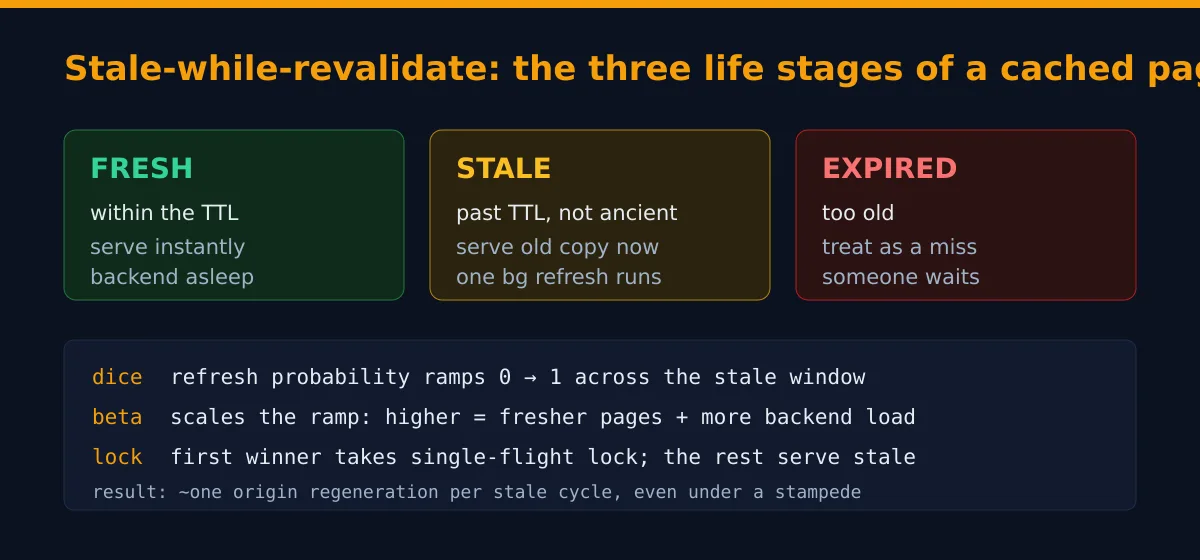
That middle stage is stale-while-revalidate, SWR for short. The naive alternative, the one every junior writes first, is “when the cache expires, the next request rebuilds it.” Sounds reasonable. It’s a trap. Picture your most popular page expiring at noon. At noon plus one millisecond, a thousand requests arrive, all see an empty cache, and all charge at your backend simultaneously to rebuild the same page. That’s a thundering herd, also lovingly known as a cache stampede or the dogpile. I’ve watched one take down a database that was, on paper, massively over-provisioned. The post-mortem was short. “It’s always the cache.” Right next to “it’s always DNS.” SWR kills the herd because nobody ever stares at an empty slot.
The dice and the beta knob
When exactly does cache-turbo refresh a stale copy? Not the instant it goes stale (a page that gets one hit an hour shouldn’t refresh the microsecond it expires). It rolls dice, and the dice get loaded the longer the copy has been stale. The model is a linear ramp across the stale window: probability zero the moment it goes stale, effectively one by the time it’s about to expire. Every reader rolls independently, so a barely-stale page almost always gets served as-is and a nearly-expired one almost certainly triggers a refresh.
The cache_turbo_beta directive scales how eager that ramp is. It’s fixed-point integer math (beta times 1000, so no floats in the hot path; the people who’ve profiled nginx workers know why that matters). At beta=1000 the probability tracks the elapsed fraction directly. Crank it to 2000 and pages refresh earlier and more often. Drop it to 500 and they coast deeper into staleness first. Higher beta means fresher pages and more backend load; lower beta means staler pages and a backend that gets to nap. That’s the entire tradeoff.
Single-flight: who actually does the work
The dice decide whether a refresh should start. They don’t decide who, because under a real burst several readers win the dice in the same instant, and if all of them refreshed you’d have reinvented the stampede. So there’s a hard lock. The first reader to claim the refresh takes a single-flight lock (cache_turbo_lock_ttl sets how long it’s held), and everyone else who rolled a winner just serves stale. One refresh per cycle, full stop. If the refreshing request dies or the backend hangs, the lock expires on its own and the next reader tries. No deadlock, no stuck entry haunting you for a week.
The SWR math here was lifted, deliberately, from the same algorithm our WordPress object-cache work uses. Same constants, same dice. Edge cache and object cache speak one language and tune the same way. That was not an accident.
Step 4: clean up the cache key
A cache key is the string that decides whether two requests are “the same page.” Get it wrong in one direction and you cache too little (every URL looks unique, hit rate is garbage). Wrong the other way and two different pages collide, and people get served each other’s content. The default is $host$request_uri: Host header plus full path and query. Two vhosts sharing one zone never collide because the host is baked in.
The real problem is junk in the query string. Marketing slaps ?utm_source=twitter on every link, and a dumb cache treats /post-42?utm_source=twitter and /post-42?utm_source=facebook as two different pages that render identically. You’re now caching the same HTML a dozen times and your hit rate is quietly bleeding out. So use the normalized-args variable:
cache_turbo_key             $host$uri$cache_turbo_normalized_args;
cache_turbo_normalize_strip sid sessionid "tmp_*";
$cache_turbo_normalized_args sorts the args (so ?b=2&a=1 and ?a=1&b=2 hit one slot) and drops a built-in denylist: utm_*, fbclid, gclid, msclkid, mc_eid, _ga, ref. Add your own with cache_turbo_normalize_strip (trailing * is a prefix match), or nuke every arg with cache_turbo_normalize_strip_all on.
Then the opposite problem: variants that genuinely differ and must not share a slot. The cache keys on the request, not on the response’s Vary header, so if your page differs by gzip-vs-brotli or mobile-vs-desktop and you don’t say so, the first variant stored wins for everyone. Fix it with a vary bucket:
cache_turbo_normalize_vary encoding device; # keep gzip ≠ brotli, mobile ≠ desktopThe encoding bucket splits by Accept-Encoding class and, as of the V6 build, ranks zstd above brotli (we ship the zstd module, so a zstd-capable client gets its own slot). The device bucket splits mobile from desktop by sniffing the User-Agent. Add only the axes your page actually varies on. Add one you don’t need and you’ve halved your hit rate for nothing.
Step 5: pick a preset, or let it tune itself
Four knobs (valid, beta, lock_ttl, stale window) is three more than most people want to think about on a Tuesday. So pick a vibe:
cache_turbo        ct;
cache_turbo_preset aggressive;| Knob | conservative | balanced (default) | aggressive |
|---|---|---|---|
| fresh TTL | 30s | 60s | 300s |
| beta (refresh eagerness) | 500 | 1000 | 3000 |
| lock_ttl | 10s | 5s | 3s |
| stale-window multiplier | ×2 | ×4 | ×8 |
The stale window works out to valid × (multiplier − 1). Balanced plus a 60-second valid means fresh for 60s, served stale for another 180s, then expired. Any explicit knob still beats the preset, so cache_turbo_preset balanced followed by cache_turbo_valid 120s does exactly what you’d hope.
If you genuinely can’t be bothered, turn on autotune:
cache_turbo_autotune on;It measures how long your backend actually takes to regenerate a page, then picks beta from that, clamped to the band your preset allows. Slow backend, it backs off so it doesn’t pile on; fast backend, it refreshes more freely. It recomputes on an interval (cache_turbo_autotune_interval, default 30s) off the live shared-memory stats. Watch it work by exposing $cache_turbo_beta as a header and watching the number drift as your backend’s mood changes. Closest this module gets to a party trick.
What it will and won’t cache
Before you go to production, know the safety rails, because a cache that serves the wrong person’s page is not a performance feature, it’s a data breach with good latency. cache-turbo only stores a 200 OK to a GET or HEAD, and it flatly refuses anything that looks per-user: a request carrying an Authorization header, a response that sets a cookie (Set-Cookie), or a response marked Cache-Control: private, no-store, no-cache, max-age=0, or s-maxage=0. Those are the signals that a page belongs to one specific human. Someone caches a page with a logged-in username in the corner, and suddenly every visitor is “Hi, Dave.” The defaults exist so you have to go out of your way to make that mistake. Don’t go out of your way.
Step 6: add a Redis L2 for a fleet
One nginx box is happy on L1 alone. The moment you have several, you want them to share a cache so one box warming a page warms everybody, and a rebooted box refills from Redis instead of stampeding the origin like a cold herd. That’s L2. One line:
# plain, same box
cache_turbo_redis redis://127.0.0.1:6379/0;

# ACL user, password, db 2, remote
cache_turbo_redis redis://cache:s3cret@10.0.0.5:6379/2;

# TLS, verifying the server cert against the system CA by default
cache_turbo_redis rediss://redis.internal:6380/0;

# TLS with a private CA and an overridden verified name
cache_turbo_redis rediss://10.0.0.5:6380/0 tls_ca=/etc/ssl/redis-ca.pem tls_name=redis.internal;
The contract that keeps it fast: write-through on store, one GET on an L1 miss, and it never touches Redis on an L1 hit. The hot path stays in local RAM; Redis only catches the misses. rediss:// (two s’s) means TLS, verification is on by default (the correct default, leave it alone unless you can say out loud why you’re turning it off), and the password sits in your nginx config so chmod 600 it and keep it out of git, same as every secret you’ve been tempted to commit at 2 a.m. and regretted. If you want a hardened Redis to point it at, our Valkey package is the obvious backend. (And if you’re wondering why compressing secret-adjacent responses is its own footgun, the BREACH attack is the cautionary tale.)
Step 7: wire up the admin endpoint, and lock it down
You get a built-in control panel: stats, purging, and cache warming. Point a location at the zone:
location = /_cache {
    cache_turbo_admin ct;
    allow 127.0.0.1;
    deny  all;
}
Curl it for JSON stats, and purge in three flavours: one page, everything sharing a tag, or the whole zone:
$ curl localhost/_cache
{"hits":1240,"misses":83,"stale_serves":12,"refreshes":11,"evictions":0,"cost_ms":34,"autotuned_beta":1700}

$ curl -X POST 'localhost/_cache?key=/blog/post-42'   # one page
$ curl -X POST 'localhost/_cache?tag=post-42'         # everything tagged
$ curl -X POST 'localhost/_cache?all=1'               # the nuclear option
$ curl -X POST 'localhost/_cache?url=/,/blog/,/about' # warm cold pages
Tag purging is the good stuff. Set cache_turbo_tag from a response header (your backend emits something like X-Cache-Tags: post-42 author-dave category-nginx) and you can invalidate every page touched by one author or one category in a single call. It needs Redis on, because the tag index lives there. This is the difference between “I edited a post” and “I have to flush everything and re-warm forty thousand pages.”
Now the part where I get loud, and it’s the one line of this whole guide I’ll state without a hedge. That allow/deny is not optional. The endpoint purges your cache and fires server-side fetches to local paths. Left public, ?all=1 is a denial-of-service button with a friendly URL, and ?url= pointed at the wrong place is a server-side request forgery primitive someone finds with a scanner inside a week. An admin endpoint with no gate isn’t a convenience, it’s an incident waiting for a CVE number.
Step 8: scrape it with Prometheus
The same endpoint speaks Prometheus. Add ?format=prometheus and point a scrape at it, every sample labelled by zone so one job watches many zones:
$ curl 'localhost/_cache?format=prometheus'
cache_turbo_hits_total{zone="ct"} 1240
cache_turbo_misses_total{zone="ct"} 83
cache_turbo_stale_serves_total{zone="ct"} 12
cache_turbo_refreshes_total{zone="ct"} 11
cache_turbo_evictions_total{zone="ct"} 0
cache_turbo_regen_cost_ms{zone="ct"} 34
cache_turbo_autotuned_beta{zone="ct"} 1700
The number you’ll stare at is hit ratio: rate(cache_turbo_hits_total[5m]) / (rate(cache_turbo_hits_total[5m]) + rate(cache_turbo_misses_total[5m])). At 0.98 your backend is asleep and you’re winning. At 0.40 something’s wrong with your key, probably tracking params you forgot to strip back in Step 4. Watch cache_turbo_evictions_total too: if it’s climbing, the zone from Step 2 is too small and the LRU is throwing out pages you wanted. Give it more RAM or accept the eviction. And gate the scrape behind the same allow/deny; your metrics are nobody else’s business.
Step 9: verify it actually works
Reload nginx (nginx -t first, always, because the missing semicolon you can’t see will take the site down on reload), then curl the URL twice and grep for the header:
$ curl -sI localhost/ | grep -i x-cache      # 1st: nothing, it was a miss
$ curl -sI localhost/ | grep -i x-cache
X-Cache: HIT                                  # 2nd: served from RAM
That header is your whole debugging story. HIT means fresh from cache. STALE means an old copy while a refresh runs in the background. No header at all means it went to the backend. When someone swears the cache “isn’t working,” this settles the argument in one curl.
Optional: stack it over nginx’s disk cache
Remember L1 holds your hot set, not the whole site? Here’s where that resolves. You can run cache-turbo and nginx’s built-in proxy_cache together, because they sit at different layers. cache-turbo runs in the ACCESS phase in shared memory; proxy_cache runs later, in the content phase, on disk. On a cache-turbo hit the request finalizes before it ever reaches proxy_pass, so the disk cache never runs. On a miss it flows through proxy_cache as usual and cache-turbo captures whatever comes back into shm. So cache-turbo becomes an L0 over the disk L1:
location / {
    cache_turbo       ct;
    cache_turbo_valid 30s;
    proxy_cache       disk;
    proxy_cache_valid 200 10m;
    proxy_pass        http://app;
}
Two things bite if you stack carelessly. The caches store and purge independently (same page can live in shm and on disk, and purging one ignores the other), so keep the disk TTL at or above the shm TTL. And cache-turbo strips the disk cache’s Age, X-Cache and X-Cache-Status before storing, so an L1 hit never replays a frozen age; cache-turbo’s own X-Cache is the source of truth, read $upstream_cache_status for the disk layer’s opinion. Rule of thumb: don’t double-cache the same content. shm for hot HTML that benefits from SWR, Redis and tag purge; disk for a huge corpus that won’t fit in RAM.
Do I still need Varnish if I run cache-turbo?
For most sites, no. Varnish is a separate daemon on a separate port with its own config language (VCL) and its own process to monitor and restart. cache-turbo gives you the same in-memory page cache plus stale-while-revalidate and a Redis tier, inside nginx itself. Reach for Varnish only if you need VCL’s full request-mangling power or an edge tier fully decoupled from your web server.
What is stale-while-revalidate, in one sentence?
When a cached page passes its freshness TTL, cache-turbo keeps serving the old copy immediately while exactly one background request fetches a fresh one, so visitors never wait on a refresh and the backend never gets stampeded by a thundering herd.
Will it ever cache a logged-in user’s page and serve it to someone else?
Not by default, and you have to work to break that. cache-turbo refuses to cache any response to a request that carried an Authorization header, any response that sets a cookie, and any response marked Cache-Control: private, no-store, no-cache, max-age=0, or s-maxage=0. The danger only appears if you override those defaults or use a cache key that ignores a real Vary axis.
Do I have to run Redis to use it?
No. L1, the per-box shared-memory cache, is always on and needs nothing extra. Redis is an optional L2 tier that lets a fleet of nginx boxes share one cache and survive reboots without stampeding the origin. It’s also required for tag-based purging. A single server is perfectly happy on L1 alone.
How is this different from nginx’s built-in proxy_cache?
proxy_cache is a disk cache in the content phase. cache-turbo is a shared-memory cache in the access phase, with stale-while-revalidate, single-flight refresh, an optional Redis tier and tag-based purging. They stack: cache-turbo becomes an L0 in front of proxy_cache’s on-disk L1. Use cache-turbo for hot HTML that benefits from RAM speed and SWR; use proxy_cache for a large on-disk corpus that won’t fit in memory.
Why must I lock down the admin endpoint?
Because it purges your cache and fires server-side fetches to local paths. Left public, POST /_cache?all=1 is a one-line denial-of-service against your own cache, and the ?url= warming verb is a server-side request forgery primitive. Always gate the admin (and Prometheus) location with allow/deny or authentication. Never expose it to the internet.
Related reading
- Valkey explained: the Redis fork that actually won: the L2 tier’s natural backend, and why we package it hardened.
- What is zstd? nginx, Angie, history and browser support: the encoding the Step 4 vary bucket ranks above brotli.
- What is the BREACH attack?: why compressing secret-adjacent responses is its own footgun.
- Database Boost: the other end of the slow-backend problem, on the database side.
One last thing, because it’s the mistake everyone makes once. Before you ship cache_turbo_preset aggressive to production, set a short cache_turbo_valid and watch your X-Cache headers and eviction counter for an afternoon. The cache that serves stale content for five minutes because you fat-fingered a TTL is the cache that gets blamed for a bug that doesn’t exist. Ask me how I know.